 Just Fold Paper
Fold only
Origami Upright Piano
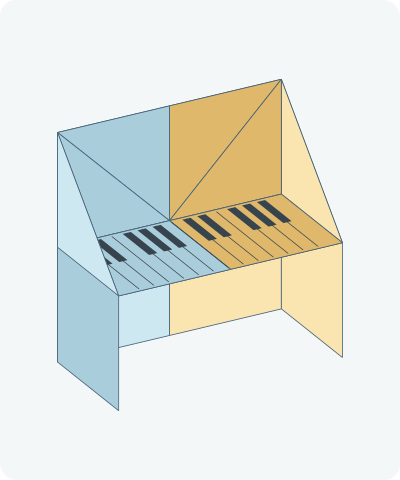
An upright paper piano with side supports and a projecting keyboard. Watch each action, follow the complete illustrated instructions or print the one-page diagrams.
Preparation + 14 numbered steps
Materials
6-inch square · 6 × 6 inches
One 6 × 6-inch square (15.24 × 15.24 cm) of thin origami paper. Optional pen for drawn details. No scissors or glue.
Drag to rotate · swipe sideways on touch.
Arrow keys rotate when focused.
Follow along
PreparationThe interactive guide needs JavaScript. Read every illustrated step below.
Help · controls & diagram
Play or drag the progress slider to watch a fold from 0% to 100%. Use the view buttons or drag the diagram to look from another angle.
Blue and gold identify the original left and right halves, not the literal colors of your paper. Darker shades show the reverse. Orange marks moving paper and its hinge.
With the diagram focused: Space plays or pauses, ←/→ change steps, and Home resets.
Every step, at a glance
Compare your paper with each diagram after completing the action. Blue and gold identify the original left and right halves, not the literal colors of your paper. Darker shades show the reverse. Orange marks moving paper and its hinge.
- 0. Prepare the square
- 1. Crease the vertical center
- 2. Reopen the square
- 3. Fold the square in half
- 4. Fold the right gate
- 5. Fold the left gate
- 6. Open and squash the right gate
- 7. Open and squash the left gate
- 8. Raise the keyboard panel
- 9. Crease the right support
- 10. Crease the left support
- 11. Open the left support halfway
- 12. Open the right support halfway
- 13. Lower the keyboard
- 14. Draw the keyboard keys
PREPARATION · Linked complete photographic construction
Prepare the square
Place the square reverse side up, with level edges.
Layers: One uncut square.
Check: The four corners are square.
Explore this step ↑STEP 1 · Linked complete photographic construction
Crease the vertical center
Bring the right edge to the left edge and crease.
Layers: Move the complete right half.
Check: The edges coincide.
Explore this step ↑STEP 2 · Linked complete photographic construction
Reopen the square
Open the fold fully.
Layers: Return the same half to the table.
Check: The vertical center crease is visible.
Explore this step ↑STEP 3 · Linked complete photographic construction
Fold the square in half
Bring the top edge down to the bottom edge.
Layers: Move the complete upper half.
Check: A wide rectangle has a closed top edge.
Explore this step ↑STEP 4 · Linked complete photographic construction
Fold the right gate
Bring the right edge to the vertical center crease.
Layers: Carry both layers of the rectangle.
Check: The right flap reaches the center.
Explore this step ↑STEP 5 · Linked complete photographic construction
Fold the left gate
Bring the left edge to the center crease.
Layers: Carry both layers.
Check: The two gates meet.
Explore this step ↑STEP 6 · Linked complete photographic construction
Open and squash the right gate
Separate the two layers of the right gate. Swing the outer wall outward while pressing the top pocket corner down to a point halfway down the rectangle. Flatten the two triangular roof faces.
Layers: The inner lower wall stays on the center panel. Its attached upper triangle turns while the outer wall opens.
Check: A sloping roof sits above two adjacent rectangular panels on the right.
Explore this step ↑STEP 7 · Linked complete photographic construction
Open and squash the left gate
Repeat with the left gate, matching the roof height on the right.
Layers: Leave the completed right side still.
Check: The model has two roof wings and a broad flat lower section.
Explore this step ↑STEP 8 · Linked complete photographic construction
Raise the keyboard panel
Lift the central lower panel up on the horizontal line at the bottom of the triangular roof. Flatten it upward.
Layers: Move the full central packet: both visible flaps and the attached layer directly beneath them. Leave the outer side rectangles on the table.
Check: The raised keyboard covers the middle of the roof.
Explore this step ↑STEP 9 · Linked complete photographic construction
Crease the right support
Fold the outer right side inward on its existing vertical crease.
Layers: Move the entire side support; keep the central panel still.
Check: The right side lies over the raised keyboard.
Explore this step ↑STEP 10 · Linked complete photographic construction
Crease the left support
Fold the outer left side inward along its existing crease.
Layers: Move the entire left support.
Check: Both supports lie flat toward the center.
Explore this step ↑STEP 11 · Linked complete photographic construction
Open the left support halfway
Lift the left support until it is at a right angle to the back panel.
Layers: Open the same support without flattening it outward.
Check: The support stands perpendicular to the back.
Explore this step ↑STEP 12 · Linked complete photographic construction
Open the right support halfway
Lift the right support to a matching right angle.
Layers: Keep the left support and back panel still.
Check: Two side supports project equally forward.
Explore this step ↑STEP 13 · Linked complete photographic construction
Lower the keyboard
Lower the raised central packet halfway, until it is perpendicular to the back and lies between the supports. You may draw keys on this projecting panel.
Layers: Move the complete keyboard packet together, keeping the supports still.
Check: The upright back, two side supports and projecting keyboard complete the miniature piano. It is a display model, not a working instrument.
Explore this step ↑STEP 14 · Linked complete photographic construction
Draw the keyboard keys
If you want keyboard details, draw evenly spaced lines from the back of the projecting panel to its front edge. Add short dark rectangles near the back in alternating groups of two and three.
Layers: These are pen marks on the folded keyboard, not new paper pieces or moving keys.
Check: The optional key pattern identifies the completed miniature piano. Keep both supports at right angles.
Explore this step ↑
Sources & notes
Origami Instructions, Origami Instructions: Origami Upright Piano (web tutorial).
Photographic construction reference ↗
The reference does not identify the model designer or grant a design-reuse license. Traditional authorship is not established here. Its photographs and prose are protected and are not reproduced. These explanatory words, geometry and drawings are independently authored; no project-wide reuse license is implied.
Adaptation: Follows the complete half-sheet organ-base piano. The center keyboard packet includes all of the original upper half below its hinge, not just the visible two flaps. Side supports and keyboard finish at authored right angles. Keys may be drawn; there are no separate moving keys and standing stability has not been tested.
Original instructions and diagrams, made with AI assistance. About & reuse
Accuracy notes
Real-paper follow-along and paper weight have not been tested. Diagrams illustrate the sequence, not paper thickness, contact, collisions or exact layer visibility. Material coordinates track the original sheet throughout the construction. Folded panels move about continuous hinges; cut seams are identified explicitly. Zero-thickness diagrams do not simulate paper thickness or prove physical foldability. Real-paper folding has not been tested.